Split the bill, clearly.
Divide an invoice equally, by fixed amounts or percentages, or assign individual line items. Each payer receives a private link for their own share.
 Guestivity
Invoicing & payments
Create the document your customer needs, share it with the right people and give them a clear way to pay.
Choose your hotel planMake it yours
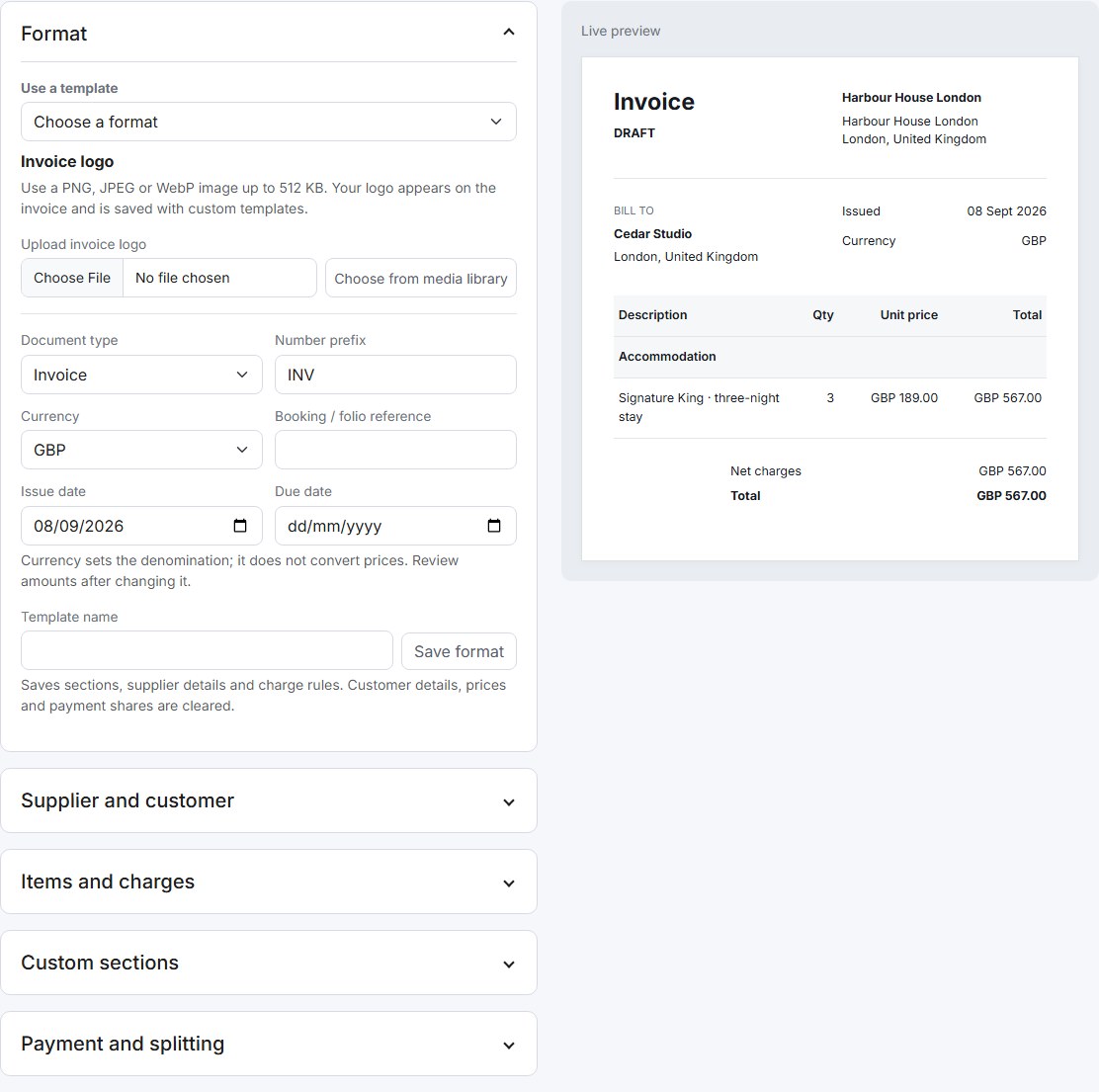
Start with tax, confirmation or pro forma formats. Add your hotel logo, supplier and customer details, invoice currency and payment terms, then check the live preview before issuing.
Custom sections give you room for stay details, bank instructions, notes and terms. Save your format as a reusable template so the next invoice starts with your hotel’s details and charge rules.
Configure taxes and document details for your own business and jurisdiction. Choosing a currency does not automatically convert prices.
Divide an invoice equally, by fixed amounts or percentages, or assign individual line items. Each payer receives a private link for their own share.
Email the invoice, copy the recipient link or share its QR code. Offer Guestivity’s integrated checkout, your own payment URL or bank-transfer instructions.
Follow issued, part-paid and paid invoices. Print or save a PDF, record reconciled offline payments and create credit notes when a document needs correcting.
Payment choice
Guest payments are separate from your Guestivity subscription. Choose from integrated checkout providers, invoice payment links and bank transfers. Configure your own accounts in Billing, with a company default and optional hotel overrides.
| Payment route | Availability | How it works |
|---|---|---|
| Stripe Connect | Integrated checkout | Connect your account through Stripe onboarding for booking and invoice payments. Guest payments remain separate from your Guestivity subscription. |
| PayPal | Integrated checkout setup | Configure your PayPal merchant account for hosted checkout, payment confirmation and full-payment refunds. |
| Square | Integrated checkout setup | Connect your Square merchant account and location for hosted checkout, payment updates and full-payment refunds. |
| Xendit | Integrated checkout setup | Southeast Asian payment options through Xendit Payment Sessions. Channels, currencies and refunds depend on your merchant account. |
| Mercado Pago | Integrated checkout setup | Hosted Checkout Pro for supported Latin American markets. Local account and currency eligibility apply; delayed payments may need reconciliation. |
| Paystack | Integrated checkout setup | Hosted payments for eligible African merchant accounts, with provider-confirmed payments and supported full-payment refunds. |
| Flutterwave | Integrated checkout setup | Hosted card and local payment options through Flutterwave, subject to country, currency and channel availability. |
| Airwallex | Integrated checkout setup | Payment links tied to the amount due. Requires an approved merchant account and enabled payment methods. |
| Revolut | Integrated checkout setup | Revolut Merchant checkout for approved accommodation businesses, with stay dates and merchant settlement settings. |
| Wise Business | Invoice links | Add your Wise Business payment link to an invoice or template. Confirm receipt and record payment manually; automatic booking checkout and refunds are not available. |
| Klarna | Eligible through Stripe | May be offered by Stripe checkout where your account, accommodation business, guest and transaction qualify. It is not a separate Guestivity gateway. |
| Afterpay / Clearpay | Eligible through Stripe | May be offered by Stripe checkout for eligible merchants and transactions, subject to accommodation approval and local availability. |
| Sampath Paycenter | Configuration only · payments inactive | Choose one of four Paycenter Web 4.0 page types, save credentials and preview card entry. Bank confirmation and acceptance testing are still required. Refunds and reconciliation await bank specifications. |
| Your payment link | Available on invoices | Add your external payment URL, with a separate link for each payer when splitting. Confirm receipt before recording payment in Guestivity. |
| Bank transfer | Available on invoices | Add bank instructions to a custom invoice section and record payment after reconciling the transfer. |
| Lemon Squeezy | Unavailable for accommodation | Lemon Squeezy is not offered as a hotel payment gateway because accommodation falls outside its supported product scope. |
Integrated checkout setup includes account configuration and verification; complete a test payment, return flow and refund before live use. Provider fees, supported countries and currencies, accommodation approval and settlement terms apply. External invoice links require manual receipt confirmation.
Your guest relationship
For stays booked directly through Guestivity, your team manages the guest conversation, invoice and payment. There is no OTA-issued payment voucher to redeem for these bookings.
Keep reservations, guest messages and invoice records in your hotel workspace, with access controlled by staff role and property.
Bookings received through an OTA keep that OTA’s payment arrangements. Payment processing and payout timing depend on your provider.
Explore the platform, choose your plan and create your hotel account.
See plans & pricing